


Whether you're getting quotes from car dealers, setting up an online dating account or returning a work call from your personal phone, there are times when keeping your number private makes sense. Fortunately there are options for short term "burner" numbers, virtual phone lines and caller ID blocking. Here's what I recommend.
Temporary "Burner" Numbers
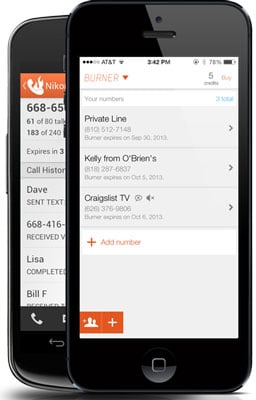 For a temporary disposable number, I like Burner (free on iTunes and Google Play). You get 20 minutes of talk time and 60 texts over a week for free and then you need to buy credits to extend service and buy new burner numbers.There's a Mini Burner ($1.99 or 3 credits) for 14 days or 20 minutes or 60 texts, whichever comes first, a Standard Burner ($3.98 or 5 credits) for 30 days or 150 texts or 50 minutes, whichever comes first, or you can pay $4.99 (8 credits) for 30 days of service with unlimited texts and calls (or $3.99 per month if you commit to a year of service). If you want to be able to send photos, there's a Picture Burner package (8 credits or $4.99) for 100 messages (with or without photos), 50 minutes or 30 days, whichever comes first. There's a text-only plan with 250 texts (no pictures) for $3.98 (5 credits). Credits can be bought in packs of 3 ($1.99), 8 ($4.99), 15 ($7.99) and 25 ($11.99).
Free Long-Term Private Number
For a more permanent calling solution, I recommend Google Voice. You get unlimited calling within the U.S. for free as well as voicemail, call screening and do not disturb, among other features. To receive a call or text, you'll need a smartphone or computer with Internet access and the Google Voice app. Or, you can choose to forward all of your Google Voice calls and texts to an existing number. Outbound calls will show your Google Voice number, instead of your real one.
Free Ad-hoc Outbound Caller ID Blocking
If you don’t want to use your disposable phone number minutes, you can block your outbound Caller ID by turning it off in your phone’s call "settings" on your mobile phone, setting it up in your phone management software if you use a digital phone service or dial *67 before the number on a regular landline phone or cell phone (for both you'll need to use the country code, so it would look like *6712125551212). Your number will appear as unavailable.
[Editor's Note 7/28/15: *67 will not work when calling toll-free numbers (800, 888, etc.) and emergency services, like 911.]
While I value openness — even when it comes to Caller ID, I can see real value in protecting my privacy in a situation where I would be dealing with strangers. It’s safer and smarter.
Another methode
Type *67. This code will work with virtually any North American provider. Some other common blocking codes include the following:- *67 - United States (except AT&T), Canada (landline), New Zealand (Vodafone phones)
- #31# - United States (AT&T phones), Australia (mobile), Albania, Argentina (mobile), Bulgaria (mobile), Denmark, Canada (mobile), France, Germany (some mobile providers), Greece (mobile), India (only after network unlock), Israel (mobile), Italy (mobile), Netherlands (KPN phones), South Africa (mobile), Spain (mobile), Sweden, Switzerland (mobile)
- *31# - Argentina (landline), Germany, Switzerland (landline)
- 1831 - Australia (landline)
- 3651 - France (landline)
- *31* - Greece (landline), Iceland, Netherlands (most carriers), Romania, South Africa (Telkom phones)
- 133 - Hong Kong
- *43 - Israel (landline)
- *67# - Italy (landline)
- 184 - Japan
- 0197 - New Zealand (Telecom or Spark phones)
- 1167 - Rotary phones in North America
- *9# - Nepal (NTC prepaid/postpaid phones only)
- *32# - Pakistan (PTCL phones)
- *23 or *23# - South Korea
- 067 - Spain (landline)
- 141 - United Kingdom, Republic of Ireland
- If your phone is on a GSM network (e.g., most Androids), you can always dial #31# to block your caller ID.
Comment for any doubt for become whatsapp group member msg add me bro to 8086053709


0 comments:
Post a Comment