Foremly Mr All In All

How to hack wpa wipe wifi android

Hello guys,we are back again with new tweaks of hacking a wifi using Androdumpper which is a wps connect software though which you can crack a wifi which has Encryption  Of Wpa/Wpa2 And Wps Enabled Your WiFi network is your conveniently wireless gateway to the internet and you will secure your network with a password.
You probably secure your network using the more bulletproof WPA security protocol ’cause you know how easy it is to crack a WEP password.But, a new, free, open-source tool called AndroDumpper can crack most routers’ current password. 
Here’s how to crack a Wep/WPA or WPA2 password step by step, with AndroDumpper. 
If You Root You Mobile It Will Easy To hack A Wifi In 1 min So After Reading This Post You Will be Able To hack A Wifi  in few Seconds.
Hacking wifi
Hack wpa/wipe wifi from android

Requirement Of Trick :- 
  • Rooted Mobile [ Has More Chance of Cracking ]  Or Non Rooted  (Less Chance)
  • Androdumpper – [Click Here]
  • Busybox – [Click Here ]
  • Intall Busybox In bin Folder Not In Xbin
  • Brain 😛
How To Hack A Wifi ? 
  • Enable your wifi 
  • Open Androdumpper
  • Wait till WiFi network scan finish. At the top, you will see how many network found and WPS Protected Networks found. If WPS Protected Networks found, you can try to connect it.
  • When you see ‘Try Connect‘ Means Wifi Network Has Wps 
  • If you are rooted, you can use both method to connect and show password.
  • It will trying to connect to the network. If you success, Network Details window will pop-up that showing you the network name and password. Copy the password and use it.
  • Boom You Hacked A Wifi 
  • Please Do Share With Your Friends And Bookmark Our Site For Instant Update 🙂
    Like Our Facebook Page To Get Instant Update From Our Site And Loot Fast  

Share:

Facebook marketing

Facebook
Facebook
Facebook is the largest social network.And it is the most famous marketing tool.Facebook has lots of branches.Like chating pages audience network at.
Now a days Facebook offers Instant articles for all users.

Instant articles

Facebooks instant article means a website connected to a page can used as post.That is you can increase your website traffic through instant article.Instant article offers different methode for loading.All pages will load in 3 to 2 seconds.And also you can use it for earnings.

Audience network

It's a tool like google adsense.Here you can monetize your website and Facebook app.And also its offers lots of revenue.And it is a right place to advertise your your ads.You will lots of customers from Facebook.
Share:

Brief Story of Hard disk

Old hard disk
Old hard disk
In the 1950s, storage hardware was measured in feet—and in tons. Back then, the era's state-of-the-art computer drive was found in IBM's RAMAC 305; it consisted of two refrigerator-size boxes that weighed about a ton each. One box held 40 24-inch dual-sided magnetic disk platters; a carriage with two recording heads suspended by compressed air moved up and down the stack to access the disks. The other cabinet contained the data processing unit, the magnetic process drum, magnetic core register and electronic logical and arithmetic circuits.
Today, we have flash drives, microdrives, and onboard solid-state drives that weigh almost nothing, hold gigabytes of data and cost (compared to the 1950s) very little. How cheap is storage now? A 1TB hard drive that sells for as little as $60 today would have been worth $1 trillion in the 1950s, when computer storage cost $1 per byte, according to Dag Spicer, senior curator of the Computer History Museum in Mountain View, Calif.And a modern-day 4GB stick of RAM would have cost $32 billion.

Computer History Museum exhibit opens

In January, the Computer History Museum will open a new exhibit called "Revolution: The First 2,000 years of Computing" that will tell the story of computing from the abacus to the smartphone. The exhibit will be housed in a $17 million, 25,000-square-foot facility containing 19 galleries, three state-of-the-art digital theaters and 1000 artifacts.
In 1956, the RAMAC 305 stored 5 million characters. Today, hard drives store as much as 3TB of data and solid-state technology is quickly approaching a terabyte of storage in a single solid-state drive

One of the museum's alcoves is dedicated to memory and storage systems because, while the semiconductor industry gets most of the credit for advances in computing through the years, storage (both short-term memory and disk drives) is the unsung hero of modern technology, according to Spicer.

"Without large storage systems you wouldn't have e-commerce, because all those giant Web sites that handle your transactions wouldn't exist," he said in a recent interview. "Google needs cheap, fast, reliable storage to process requests."
Share:

How to escape from creadit card skimmers

Whenever you put your card into a gas pump or an ATM you run the risk of having your information skimmed.

To some extent, skimming is one of those things you don't realize you're a victim of until long after it happens. In the past few months, I've had a number of friends discover that their credit card numbers were being used by identity thieves who presumably captured their credit card information while they were pumping gas or withdrawing money. Now there's an app that might be able to help prevent you becoming a victim.

Called Skimmer Scammer , the Android app (unfortunately, there's no iPhone version) looks for a Bluetooth module near that ATM or gas pump that is typically used with credit card skimmers. ZDNet explains that the module is what typically allows skimmers to download all the credit card numbers they've captured without getting detected. The skimmer transmits number to the module where they're all saved until someone comes along to collect them. Since the person isn't physically interacting with the skimmer, they could just be sitting in a car nearby or even standing beside the offending pump at the gas station downloading numbers.

You'd think that a device broadcasting a Bluetooth signal would catch someone's attention, but apparently not.
However, that Bluetooth signal can work to your advantage. Using Skimmer Scammer, the app will find the Bluetooth signal coming from the skimmer and let you know that where you're thinking about using your card is potentially unsafe.

Skimmer scanner
Skimmer scanner from google play
As it turns out, a lot of scammers acquire the exact same skimmers, and they're not super knowledgeable about how they work, so they don't know how to fix their security vulnerabilities (go figure?). Most of the modules have the same device name (HC-5) and a pairing passcode of 1234. 

It's not a full-proof plan. This app is only going to find one type of skimmer, but it's the most popular one. That said, launching the app before you fill up your tank or use that ATM in the back of the bar could help you detect a non-tech-savvy criminal and save yourself the headache of dealing with stolen credit card numbers. 
Share:

History of Facebook

Mark Zuckerberg, 23, founded Facebook while studying psychology at Harvard University. A keen computer programmer, Mr Zuckerberg had already developed a number of social-networking websites for fellow students, including Coursematch, which allowed users to view people taking their degree, and Facemash, where you could rate people's attractiveness.

In February 2004 Mr Zuckerberg launched "The facebook", as it was originally known; the name taken from the sheets of paper distributed to freshmen, profiling students and staff. Within 24 hours, 1,200 Harvard students had signed up, and after one month, over half of the undergraduate population had a profile.
The network was promptly extended to other Boston universities, the Ivy League and eventually all US universities. It became Facebook.com in August 2005 after the address was purchased for $200,000. US high schools could sign up from September 2005, then it began to spread worldwide, reaching UK universities the following month.
founder of Facebook
Mark xuckerberg
As of September 2006, the network was extended beyond educational institutions to anyone with a registered email address. The site remains free to join, and makes a profit through advertising revenue. Yahoo and Google are among companies which have expressed interest in a buy-out, with rumoured figures of around $2bn (£975m) being discussed. Mr Zuckerberg has so far refused to sell.
The site's features have continued to develop during 2007. Users can now give gifts to friends, post free classified advertisements and even develop their own applications - graffiti and Scrabble are particularly popular.
This month the company announced that the number of registered users had reached 30 million, making it the largest social-networking site with an education focus.
Earlier in the year there were rumours that Prince William had registered, but it was later revealed to be a mere impostor. The MP David Miliband, the radio DJ Jo Whiley, the actor Orlando Bloom, the artist Tracey Emin and the founder of Wikipedia, Jimmy Wales, are among confirmed high-profile members.
This month officials banned a flash-mob-style water fight in Hyde Park, organised through Facebook, due to public safety fears. And there was further controversy at Oxford as students became aware that university authorities were checking their Facebook profiles.
The legal case against Facebook dates back to September 2004, when Divya Narendra, and the brothers Cameron and Tyler Winklevoss, who founded the social-networking site ConnectU, accused Mr Zuckerberg of copying their ideas and coding. Mr Zuckerberg had worked as a computer programmer for them when they were all at Harvard before Facebook was created.
The case was dismissed due to a technicality in March 2007 but without a ruling.
Share:

How to increase your internet speed

At the very starting of this post I must need to say that if you are reading this post hoping to get some secret magic trick to increase your internet download speed like you see in many YouTube fake videos, then I will request you to leave this post, because there is no magical trick to increase your internet download speed. Here in this post I will show you how you can utilize your internet bandwidth properly so that you always get the speed you pay for every month. Also I’m going to show you why there is no magical trick to increase internet speed. All the magical internet speed hike posts and videos are made for mainly two reasons. Either to insert some virus into your PC or to make you fool.
internet speed
How to increase internet speed
Some reasons for low internet speed

1.Virus/Malware

There are many reasons for getting slow internet speed. One of the major reason is virus or malware. Virus like key logger actually take all the sensitive information from your computer and keep sending them to the author by using your internet, which actually slows down your internet performance. There are also many virus which actually just keep uses your network and internet connection for various nasty works and mainly to jam your network. So, I will highly suggest you to get a good and original antivirus for your PC. Don’t use pirated stuffs, it will make your PC even more vulnerable. If you can’t afford that, get at least Microsoft Security Essentials for your PC. It is completely free and awesome. Also sometimes few virus gets attached to your OS such a way that the only way to remove them is reformatting the OS.
Also read
And one of the main reason is background working apps.So if you want to increase your internet speed you must use a task manager or anything like that to stop background apps.

3. Slow data package

As I said earlier, many users don’t even know that what internet speed package they are using and just scream for more speed. If you don’t know the speed details of you connect, I will highly suggest you to contact your ISP and know more about the maximum speed allowed in the package you are already subscribed. Then you can use the calculation I have mentioned above to calculate the maximum download speed you can get from your connection. If you don’t like that, then you can always upgrade your internet speed package. Please contact your ISP for more information about any upgradation.
Also read

4. Using default internet downloader

Most of the people uses the built-in browser downloader for downloading their file. If you are downloading small work files, then these built-in browser downloader will be enough for you. If you are downloading large and big files, these built-in downloader can never give you the optimum download speed you deserve instead you might see drop in the download speed after few time if you are using browser’s built-in downloader. As per my review no browser’s built-in downloader is good enough to handle large downloads.
So i recommend you to use Internet download manager

Conclusion

So, after reading this article if hope you do understand that why there is no magical trick to increase your internet speed. Just make sure you don’t try those fake tricks shown in some YouTube videos. If you follow the steps I’ve mentioned in this article, I can assure you that you will see the result by yourself.
Share:

Why google is called google

Google is the most popular search engine.And do you know how google got their name?
Google is a large tech company headquartered in Mountain View, California. Their primary product is the world’s most popular search engine. You can access the Google search engine by typing in “google.com.”

Ha! You didn’t REALLY think I was going to be defining Google, did you?

No, I trust that you have been on the Internet once or twice in the past decade and are aware of the Google.

What I wanted to talk about today is how Google got its name. You know, that silly made up word that has now taken its rightful place in the Oxford English Dictionary, right after goog (Australian slang for an egg).

Turns out that Google is a misspelling of a real-life mathematical term, googol.

Back sometime in the late 90’s Larry Page and Sergey Brin were two graduate students at Stanford. They had been working on a search engine and had given it the name BackRub. You know, because their search engine searched through backlinks…right.

Fortunately, they were smart enough to realize that BackRub was the worst tech company name in the history of tech companies, and that they needed to find something a little more appropriate.

During yet another name brainstorming session, their friend Sean, a fellow graduate student, suggested the word googolplex.

Googol is the term used by mathematician to reference 10 to the power of hundred.

Or

 In 1997 what we now know as Google was called Backrub. They decided to change the name to Googol (A googol is very large number: 10^100 to be exact) but when they registered the domain they typed Google! The rest is history.
Yahoo got its name through the acronym “Yet another hierarchal officious oracle”
And last but not least, Bing! Although there’s no confirmation from Microsoft on this, many people believe that Bing is an acronym also: Because It’s Not Google.

Share:

Root any android phone new app released

Android phone rooting means breaking the security of android phone to get more option and use it without any restrictions.
And also rooting means geting the developer optipns for it.
Normal phone users never do rooting but legend do it.And here i will tell you how to rooot android phone.
But first you need to know that rooting will cause your phone damage And dont do without any backup of your data

How to root Android phone


Files required
Root-file
compatible firmware
SM-G532F
SM-G532G

Also you can get lot of tech video from my youtube channel Mr All In All.
And If you have any doubt or suggestion please comment below.I will reply for it.

Advantage of rooting

  • You can use any app on uour phone
  • You can test security of your phone
  • You can use rooted application on your phone
  • you can change your os like android to windows etc
  • You can edit data of any app

Disadvantage

Share:

How whatsapp earning money

Whatsapp is the most popular social media.And they will dont show any ads and etc service,until yesterday i was also wondering how they make money or how they will get revenue.After my research i founded it
whatsapp-earnings
WhatsApp app
Whatsapp enables its user to send text messages, images, video and audio media to other users. The said service is available on iOS, android, Symbian, blackberry OS and windows platforms.
On a different note, Facebook has recently bought Whatsapp. Read about Top 5 blogger tricks
Whatsapp is earning its revenue through two different ways:
1) Subscription Fee: Whatsapp allows it’s user to enjoy the services for free for first year. However, after that it charges $0.99 for continued service. But till date, I have not heard of a single person who has paid for this service. Interestingly, it tends to extend the free service period every time a user reaches close to the expiry date.
So this method of revenue generation that seems like the only visible revenue generation scheme is actually not generating the revenue.
2) According to our speculation, the revenue generation for Whatsapp is primarily through database management. All the conversations on Whatsapp are backed up on Whatsapp servers constantly. Our conversations reflect our interests, likes, dislikes and majorly depicts our preferences. This information is invaluable to big firms where relevant tailor made products can be offered after data sorting.
Let’s take a deeper look into this!
Whatsapp users have been ever increasing since the launch currently numbering out users on any other competitor.

if you have any suggestion comment below
Share:

How to increase your website traffic google search engine tips

Google search engine is the most powerful and responsible way to increase views to your site or blogger.
Search engine seo
Gogle search engine seo
There is free tool available for to increase your website traffic.The tool is provided by google.For seo optimisation all bloggers are using the tool.

Google search console

Google search console is tool provided by google for website owners to get result from google search.

Steps to get traffic

  1.  Signup on google search console
  2. Verify your website
  3. Submit site to google sitemap

Explained steps with pictures

Singn up

Google search console sing up from the given link

Verify your site
Verifying website
From the home page you can see a button in red color named add property click that option
Submit your url
After clicking the option you can see a popup window for submitting your website url.Submit your url.


Verify your site
And in the next meno you will be asked for verifying your site.There are lots of way to verify your website.
I recommend you to use meta tag option

Submit your site to sitemap
This is the main part of this article.After completing all the steps mentioned above.You want to submit your site for sitemap.By submitting your site you can increase your website traffic through search engine.

First goto search console home page
1. After it click crawl
Crawl option
2. Then click sitemap
Siremap
3. Then you can see a option Add sitemap
Add sitemap
4. Then copy and paste the given code to the free space
Text box


Thats it now you will get great traffic to your website from google search.
Thanks and stay tuned
Share:

Useful sites for you

1. Netflixroulette.net

Find something to watch random on Netflix

2. Favouriteandforget.com

Most useful and educational links in the web.

3. Ninite.com

Download the all free software you want at the same time.

4. Shouodiremoveit.com

Find app from your computee which should uninstall immediately

5. Mint.com

It budgets your money

6. Oldversion.com

Get old versions of any software

7. Printgriendly.com

Make any page print friendly

8. Keybr.com

Practice your typing skills and increase typing skill

9. Fuckduckgo.com

A search engine which not follow you

10. Freecycle.org

A group of people which gives you free stuff in their towns

11. Pipl.com

A search engine which find people

12. Whatismyip.com

It find outs your ip

13. Mailvu.com

Its a video mail

14. Himestyler.com

Design your dream house

15. Twofoods.com

Compare any 2 foods
Share:

Top Az professional video editing apps

There are lots of video editing apps in playstore.So here is some intresting video editing apps.

1. Kinemaster

Personally i am a fan of kinemaster becuase its have lots of functions like Overlay,videolayer,chromakey,easy cut,merge video,etc so it is tge most usefull app for video editing.
Top first video editing app
Kinemaster menu and other options

Main functions

  • User friendly
  • Multiple layer of video image effects
  • Download amazing effects
  • Instant preview of all edits
  • Frame by frame triming
  • Audio filters
  • Lots of animation style
  • Speed control
  • Transition effects
Get it on Google Play
Kinemaster download link

Also read :- Top 5 blogger tricks


2. Power director

Comparing kinemaster Piwer director also have the functions of kinemaster.It  have some popular functions.Second most rated video editing app
Top video editing app
Power director option

Main functions
  • Fainal cut
  • Professional video editing
  • Full 360° video editing
  • Video effects and translation
  • Video color editor
  • Cinemagraphs
Get it on Google Play
Power director google play link

Also read :- Best android briwsers


3. Viva video pro

It is the most famous video editing app available in google play but my opinion is it is the most worst app.Personally i dont like this becuase it is not a professional video editing app but it does some basic functions.
Viva video editor

Main functions

  • User friendly
  • Add text stickers etc
  • Add audio
  • Top translation effects
  • Video speed control
  • Slide show maker
Get it on Google Play
Download the app and creat amazing videos
Share:

How to earn free google play creadit

Do you want to earn some extra cash to spend on Google Store? If you are a regular Google Play Store buyer, you will prefer to spare money. You can buy movies, music, & even compare ‘Pokecoins’ on Pokémon GO.

A very useful Google application is also one of the most unknown and should be exploited by Android users. We are talking about Google Opinion Rewards, the company’s App that gives money in the form of Play Store credits for answering opinion surveys. Easy and simple! Google Play becomes even more interesting and bets on a ‘high roll’ to please the loyal buyers and attract more users. Let’s some of the easy and quick ways to earn free Google Play credits, shall we?

Questions & Credits

Do not expect to find a bank of questionnaires ready to be answered, it is random. Google Opinion Rewards sends them only when it’s needed. So, all you have to do is wait & answer to get back a pocket full of credits.
You will receive a message in the notification center every time you receive a new survey to answer. Unfortunately, not all questionnaires generate credits, and you do not have queries to answer daily. Some of them serve more to map out the type of user you are so that the surveys that are sent are more appropriate to your profile.
The first step, obviously, is to download Google Opinion Rewards

Google Opinion Rewards App Download Step By Step:

To install Google Opinion Rewards, go to Google Play, download and then follow these simple steps:
  • Enter a valid email address to register
  • Create “Google Wallet“. It is a kind of virtual wallet where your “money” will be deposited to be used later in the purchase of other Apps.
  • Enter your name, zip code, and location.
  • Read and agree to terms by responding to an initial questionnaire for Google to understand your profile.
  • Advance to the tutorial, &
  • Respond to another survey that is just for viewing your level of interest (it will not generate points).
  • Did you go through these steps? Now just wait for Google to send you small questionnaires as you accumulate the “money” in your virtual bag.

6 Tips to Earn Free Google Play Credits Google Opinion Rewards

The questions come from companies (or Google itself) that need certain data for their searches and end up using Google as a tool. It turns out to be a safe and anonymous way to get money in the Google Play Store relatively quickly.
Right after you install the app on your Android device, it may take a while for your searches to start appearing, but there are ways to make them look more consistent if you can get Google to take interest in you. For this, there are some very simple tips:

Open the app once a day

Google will know if you’ve opened the app every day and this will make you a more interested person in their view. Of course, this increases your chances of getting more questions and free credits.

Be objective in answers

Instead of just answering “yes” or “no” in open-ended questions, try to be a bit more objective. It is not necessary to write huge texts, just leave the answers a little more interesting. Also, when you receive purchase questions, do not be afraid to say that you have purchased certain products or services, as Google may have future questionnaires about it.
Share:

Top and best shoping sites

Shoping sites
In this advanced centuary no one has enough time to spent time for shoping.So the marketers used this opportunity as online shoping.There are lots of online shopping on the internet,but some website only give you the best price and best products.
So in this article i will give you the right and best choice for you.
Online shopping sites entirely change the way of shopping. Open the shopping sites, find the great deals and place the order. If the product is not as per requirement then return it.

1. Amazon

     Amazon is my favorite shopping site and gets the first position in the list of best-shopping sites in India. The one of the best customer care service is the main reason behind the success of Amazon in India.Amazon is the most famous shoping in the world.And it has its own quality.
 Best features
  • It includes all products like cloths furniture technology gadgets apps songs and videos
  • Quality of products.Amazon only sells only quality products.So it is the best choice.
  • Products availability.And also there you can find anything on amzone and with stocks
  • Best offers.There some Amazon days for offers and they give special offers for every special day
  • Products return and refund.You can return any products you

2. Flipkart

Top shoping site

An Indian company Flipkart is one of the most popular e-commerce company among the Indians. Flipkart offers the same range of products as the Amazon expect the grocery items.This one has to come first hands down. The entire country is completely dependent on Flipkart for nearly all their shopping needs. Flipkart sells everything from gift vouchers to electronics to home appliances. In fact, statistics claim that there are more items on flipkart than in a mall. Hence, Indians are heavily reliant on flipkart for all their shopping needs.
To complete with the Amazon, Flipkart acquires the Myntra. Despite, of that Flipkart is at that second position because of Amazon’s unbeatable customer service.

3. Snapdeal

   
Snapdeal indian shoping site
Firstly i like snapdeal personally because it is completely an indian site and it offers various offer.
Snapdeal is a completely Indian website and is often preferred by the masses for its cheap rates. It sells products at really low prices and hence, is a favourite of the masses. It is a good idea to buy from Snapdeal if you are looking for absolutely cheap prices.You can find great deals on the snapdeal that make it popular. But if you ask about its customer service then the answer is it gives one of the worst customer service..However, there have been times when consumers have complained of the products of Snapdeal and hence, some of them stay away from Snapdeal.

3. Myntra

Myntra
Myntra is at the first position in the list of fashion online sites. It offers a wide range of clothes along with the accessories. You will find clothes of every brand on the myntra.Although flipkart acquires myntra, yet it is a separate online site..An equally large number of women favour myntra over jabong. Myntra also has a large number of accessories and clothes on its online portal. It has a large number of categories as well and one can buy from a category of their choices. From western to ethnic to traditional, all kinds of clothes are sold on myntra.
Share:

Best browsers for android

In this article i like to share some useful informations for you,so i decided to share sime information about internet browsing.
There is a lot of browsers for browsing.But here you will get best browser and their tip features.

  1. Google chrome

Among the android users goigle chrome is the best and user friendly browser and it is a product from google.And the main features are

  • Design and layout
          Google chrome is the best designed browser and it is comparable with google sites and it includes all google products

  • Settings and options
          

Browser option
Browser options
    And it have nice feature you can easly turn a mobile friendly page to desktop
  • Privacy
        The browser also keep our data safe from hackers and crackers.So it is the most using browser in Android

2. Uc browser

And in India uc browser is the second most used browser because it have lots of options more than the google chrome.And it also offers some offers for users to get free cash and price.

Uc browser
Features
  • Browsing
        Uc browser fastly brows than any browsers.And it is the one of the main reason for using this browser
  • Download
        And also in the browser competition the main thing that irritates users is downloading and its speed.But in uc browser it have highly speeded downloading system.So the main reason users use the browser is its downloading speed

If you have any suggestion comment below and for join our whatsapp broadcast send add me to 8086053709
Share:

GOOGLE released new app for paying and its trick to get money

Now a days we know paytm is the best app for shoping online bill paying retailer shop paying etc.But today there is a new app to pay anything.The app was created by GOOGLE.As you know google has a great role in the centuary they decided to be a part of purchase.So they created the app.
Google new app

+ Pay your friends and family anywhere anytime
Use Tez for daily transactions and also larger transfers easily. You can pay or receive money from anyone who has the Tez App or any other UPI supported app by simply selecting them from your contacts list or by entering their UPI ID.

+ Multiple layers of security from your bank, UPI, and Google
Your money is secure with Tez Shield working 24/7 to help detect fraud, prevent hacking, and verify your identity. Each transaction is secured with your UPI PIN and the app is secured with a Google PIN or fingerprint.

+ Transfer money to anyone nearby
Use Cash Mode to securely send money to people nearby without sharing private details like your phone number.

+ Made for India
Tez works with all major Indian banks and with a vast majority of smartphones, so you can pay or get paid by almost anyone. Tez offers language support for English, Hindi, Bengali, Gujarati, Kannada, Marathi, Tamil, and Telugu. To establish an account and to use Tez, you must be in India, have an Indian bank account and an Indian mobile number.

+ Get Rewarded
Get Tez Scratch Cards (TM) in the app and be eligible to win up to ₹1,000 with each eligible transaction. Plus, your weekly transactions** enroll you in Tez’s Lucky Sundays contest where you could win ₹1 lakh every week.

**Transactions must be ₹50 or more per user. See full Tez Offers Terms and Conditions for all details.

+ Paying in shops is easier than ever!
The chaiwala nearby, your milk delivery service or even your favourite salon can now accept payments on the spot with Cash Mode. Pay instantly and get quick payment confirmation all while keeping your personal and bank details private.

Small business owner? Use Tez with your current account to start accepting digital payments***. Get paid directly to your bank account instantly.

***Merchants with individual current accounts can receive up to ₹50,000 per month with UPI with no fees. Beyond that, your bank may charge fees or may impose additional requirements.

+ Pay online with Tez
Tez makes it faster and more secure to pay on apps and websites - anywhere UPI is accepted. When you checkout, look for the Tez logo or use your Tez UPI ID.Features of the App

- Transfer directly to your bank account. Simply link your account to Tez over UPI and instantly transfer money from bank to bank.
- Know your money is secure. With Google’s multi layered security and 24/7 protection by Tez Shield, you can make payments and transfer amounts both big and small, with confidence.
- With Tez’s Cash Mode, you can instantly send or receive payments to anyone nearby without sharing personal details like your phone number or bank account.

      GOOGLE TEZ

To get unlimited free tez cash
1)Invite friends to earn rs51
   Share with friends and get rs 51 when            they singn up and do first transection
Tricks to get loot
  • Invite your self and Singn up with your different numbers and with your friends
  • Do any transection (at least 10)
  • And both you will get rs 51 and total you earned is 102 (51 + 51)
  • Share the money to your account
Repeat this unlimited time and get unlimited money
Share:

Unlock Android Pattern/Pin Lock in Emergency mode


1-First of all, you need to switch off your android device and keep it for some time.
2- After switching of your android device, press your up ↑ volume button and Press It down.
3- Now press the power button and hold it too along with the volume up button.
4- It will start a secret terminal interface.
5- Then press to use home button for scroll volume up and down.
6- Then you will get to the choose option Delete All User Data.
7- Now in this way, your android lock pattern is unlocked now problem is solved.
Your device will take some time but after it will restart and you will find out your android device has been unlocked.

Use Samsung's 'Find My Mobile' Service

If you have a Samsung device, a similar service called Find My Mobile should be the first thing you try. Start by heading to this link from any web browser, then log into your Samsung account. If you never set up a Samsung account, this method will not work, unfortunately. Also, some carriers, like Sprint, lock out this service, which is something to keep in find.
Once you've logged into your Samsung account, click the "Lock my screen" button in the left-hand pane. From here, enter a new PIN in the first field, then click the "Lock" button near the bottom of the screen. Within a minute or two, your lock screen password should be changed to the PIN you just entered, which you can use to unlock your device.

Top screen locks apps

There are lots of screen lock apps are available at google play.But some apps have amazing features.So below there are some lits of screen lock apps.

 1. Time lock

Main functions of this application

Lock 
Lock your screen lock as long as you selected.you can make call during the lock
Countdown
Simple countdown timer
Perfect for every location

2. Lock lock

This is a lock which is not exactly a lock screen. Isn’t irony it? But this lock screen is much more fun than any lock screen could be. It is recommended to try this lock screen app if the user wants to have some fun but the fun along with the friends and not alone.The idea of the app is so simple. Install this app on the user’s device along with their friends and form a group. The people in the group will have the same lock screen as it could be compared with a whiteboard. So, now the user can just draw and done. That is going to be updated with others members of the group, who will soon see it when they pick their devices.

Share:

Calle friends with private name id

Whether you're getting quotes from car dealers, setting up an online dating account or returning a work call from your personal phone, there are times when keeping your number private makes sense. Fortunately there are options for short term "burner" numbers, virtual phone lines and caller ID blocking. Here's what I recommend.

Temporary "Burner" Numbers

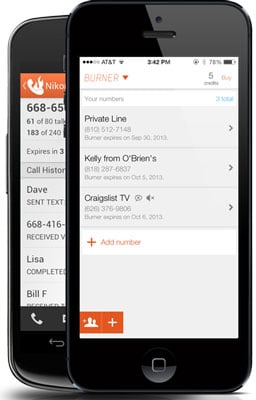
Burner appFor a temporary disposable number, I like Burner (free on iTunes and Google Play). You get 20 minutes of talk time and 60 texts over a week for free and then you need to buy credits to extend service and buy new burner numbers.There's a Mini Burner ($1.99  or 3 credits) for 14 days or 20 minutes or 60 texts, whichever comes first, a Standard Burner ($3.98 or 5 credits) for 30 days or 150 texts or 50 minutes, whichever comes first, or you can pay $4.99 (8 credits) for 30 days of service with unlimited texts and calls (or $3.99 per month if you commit to a year of service). If you want to be able to send photos, there's a Picture Burner package (8 credits or $4.99) for 100 messages (with or without photos), 50 minutes or 30 days, whichever comes first. There's a text-only plan with 250 texts (no pictures) for $3.98 (5 credits). Credits can be bought in packs of 3 ($1.99), 8 ($4.99), 15 ($7.99) and 25 ($11.99).

Free Long-Term Private Number

For a more permanent calling solution, I recommend Google Voice. You get unlimited calling within the U.S. for free as well as voicemail, call screening and do not disturb, among other features. To receive a call or text, you'll need a smartphone or computer with Internet access and the Google Voice app. Or, you can choose to forward all of your Google Voice calls and texts to an existing number. Outbound calls will show your Google Voice number, instead of your real one.

Free Ad-hoc Outbound Caller ID Blocking

If you don’t want to use your disposable phone number minutes, you can block your outbound Caller ID by turning it off in your phone’s call "settings" on your mobile phone, setting it up in your phone management software if you use a digital phone service or dial *67 before the number on a regular landline phone or cell phone (for both you'll need to use the country code, so it would look like *6712125551212). Your number will appear as unavailable.
[Editor's Note 7/28/15: *67 will not work when calling toll-free numbers (800, 888, etc.) and emergency services, like 911.]
While I value openness — even when it comes to Caller ID, I can see real value in protecting my privacy in a situation where I would be dealing with strangers. It’s safer and smarter.

Another methode

Type *67. This code will work with virtually any North American provider. Some other common blocking codes include the following:
  • *67 - United States (except AT&T), Canada (landline), New Zealand (Vodafone phones)
  • #31# - United States (AT&T phones), Australia (mobile), Albania, Argentina (mobile), Bulgaria (mobile), Denmark, Canada (mobile), France, Germany (some mobile providers), Greece (mobile), India (only after network unlock), Israel (mobile), Italy (mobile), Netherlands (KPN phones), South Africa (mobile), Spain (mobile), Sweden, Switzerland (mobile)
  • *31# - Argentina (landline), Germany, Switzerland (landline)
  • 1831 - Australia (landline)
  • 3651 - France (landline)
  • *31* - Greece (landline), Iceland, Netherlands (most carriers), Romania, South Africa (Telkom phones)
  • 133 - Hong Kong
  • *43 - Israel (landline)
  • *67# - Italy (landline)
  • 184 - Japan
  • 0197 - New Zealand (Telecom or Spark phones)
  • 1167 - Rotary phones in North America
  • *9# - Nepal (NTC prepaid/postpaid phones only)
  • *32# - Pakistan (PTCL phones)
  • *23 or *23# - South Korea
  • 067 - Spain (landline)
  • 141 - United Kingdom, Republic of Ireland
  • If your phone is on a GSM network (e.g., most Androids), you can always dial #31# to block your caller ID.

Comment for any doubt for become whatsapp group member msg add me bro to 8086053709
Share:

Pages

Search This Blog